


Spades Offline - Card Game
4.91.23K Reviews
App Specs
- Version
- 1.9.8
- Updated On
- License
- Free
- Downloads
- 500,000+
- Developer
- Battery Stats Saver
- Categories
- Card
- Platform
- Android, iOS
Screenshots

 Analysis by AppCompare
What makes this game worth considering is not just the promise of a card game away from Wi-Fi, but how that kind of play fits into ordinary life. I find Spades Offline - Card Game most appealing when I want a familiar pastime that does not depend on coordinating a table of people. It can suit a quiet break, a journey, or a player learning the rhythm of Spades at their own pace. The main question is whether its presentation and play style work for you, especially if reading cards or tapping small controls is tiring.
Readable cards, straightforward navigation
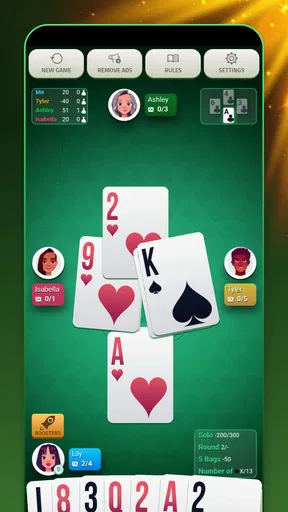
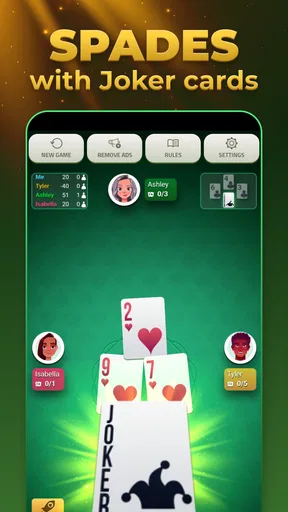
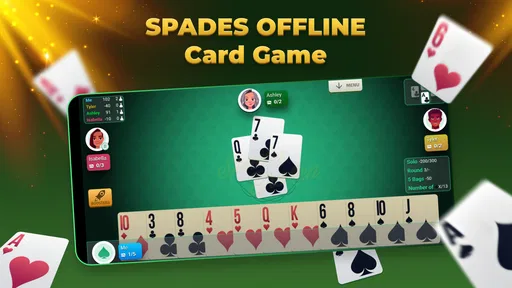
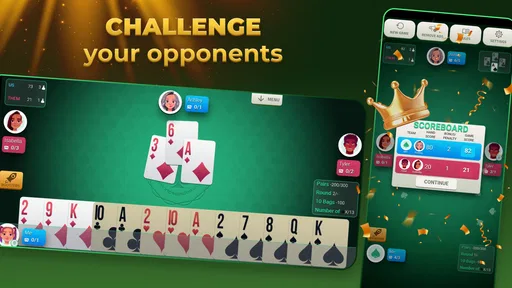
The screen is built around a card table, so the important information is the cards in play and the choices available on a turn. In my experience, a digital table can be easier to keep organized than a physical hand: cards stay in place, and there is no need to hold or sort them. That is a practical advantage for someone playing one-handed or taking a short session between other tasks, though it does not automatically make every on-screen detail comfortable for every player.
The menus are described as simple to move through, and the tutorial is useful if you are still learning the rules. I would treat it as a starting point rather than a substitute for understanding the decisions behind a bid or a play. Spades depends on following the trick and anticipating what other players may hold, so a new player benefits from taking time to understand each turn instead of tapping quickly just to get through a hand.
For readability, I would check the card faces on your own device before settling in for a long session. A card that looks clear on one screen may feel cramped on another, especially if you use a smaller phone or enlarge system text. The game’s visual simplicity can help keep attention on the table, but a clean layout is not the same as adjustable text or a full accessibility setting. If card ranks are hard for you to distinguish at a glance, short sessions are a sensible way to see whether the display works comfortably.
Input, pace, and sensory comfort
Card games are generally less demanding on quick reactions than action games, and that is part of the appeal here. A turn-based hand gives me time to consider what I want to play, which can be friendlier for someone who dislikes rapid tapping. It may also be easier to pause mentally between decisions than in a game built around constant movement. Still, tapping the right card is the central interaction, so limited dexterity or accidental touches can make play frustrating if the cards are close together.
Sound is another personal consideration. The published description of the experience mentions background music, but players who prefer silence, use a device in a shared space, or are sensitive to ongoing audio should check the in-game and device sound controls before starting. I would not assume that music is necessary to follow a hand; the visual table is the core of play. Turning sound down at the device level can be a practical option when you want a quiet game, though it may also mute other audio you rely on.
There is a useful trade-off between a digital opponent and a human table. Playing alone avoids the social pressure of keeping up with other people and makes it easier to practise at your own pace. A human game, on the other hand, brings the conversation, unpredictability, and shared strategy that many Spades fans enjoy. If your main reason for playing is spending time with friends, an offline solo session will not replace that social part, even if it keeps your card skills warm.
Worth Reading Before You Choose

EA SPORTS FC Mobile 26 Is a Bigger Football Game, but It Takes Time

Flipboard Shows What News Apps Must Do Beyond the Feed

Switching to Android Auto Means Rethinking Your Driving Routine

Google Calendar Makes a Crowded Week Easier to Manage

Ludo King Makes the Most of the Minutes Between Plans

Baby Panda World Brings Quick Play to Modern Phones, but Its Game Library Feels Busy
Where offline play fits into the day
A realistic use for this game is a train ride through a stretch with unreliable reception. You can start a hand while waiting, put the phone away when your stop arrives, and return to another session later without needing to find a group or a connection. The same idea applies to a lunch break or a quiet evening when you have a few minutes but do not want to scroll through feeds. Offline play is most valuable in those small gaps, rather than as a promise that every setting or feature will work without a connection.
That distinction matters if you are deciding whether it can replace a physical deck. A deck works anywhere and makes conversation effortless, but it needs other players and a surface. A digital Spades game is easier to carry and can provide an opponent when nobody is available, while losing some of the table talk and shared decision-making. Compared with other phone card games, this one is a more focused choice for someone specifically interested in Spades; a broad card-game collection may be a better fit if you regularly switch between several different games.
For practice, I would use individual hands to pay attention to one decision at a time. Rather than treating every win as proof that a strategy works, notice whether a bid felt realistic and what the cards played tell you about the remaining tricks. This makes a solo session more useful than simply letting hands run in the background. It also gives beginners a low-pressure way to build familiarity before joining a real table, while experienced players should remember that an AI opponent is not a perfect stand-in for human habits.
Who is likely to enjoy it—and who may prefer another option
I would recommend trying it if you already enjoy Spades, want a portable way to play alone, or are curious about learning the basic flow without asking friends to teach every turn. It is also a reasonable choice for someone who likes a steady, thoughtful game rather than fast reactions. Players who need an offline pastime on a commute may appreciate being able to pick up a hand when the moment allows, provided their screen is comfortable to use.
I would look elsewhere if your priority is lively online competition, face-to-face conversation, or a large variety of unrelated card games. A physical deck is better for a family gathering where the social ritual is the point. A multiplayer-focused title is a stronger match if you want to meet opponents or coordinate regular games online. And if you need prominent accessibility controls such as a confirmed screen-reader flow, highly adjustable card sizes, or extensive visual options, check the actual app on your device before relying on it; I would not choose any card game on assumptions about support that you have not tested.
What to check before committing to longer sessions
The game is free to download, but it includes optional in-app purchases priced from $0.99 to $99.99 per item. That wide range is worth keeping in mind if you share a device with a younger player or prefer to avoid accidental spending. The game has a Teen content rating, so it is not automatically a fit for every child. I would review purchase settings on the device and make sure the person playing understands that optional purchases are separate from simply trying the game.
It was released on November 25, 2021, and its current version is 1.9.8. It runs on Android 5.0 and later, which gives it a broad range of Android compatibility, while the developer is Battery Stats Saver. Its 4.8 average comes from around 20,000 ratings, and it has over 500,000 installs. Those figures suggest that plenty of players have tried it, but they do not answer the more personal questions: whether the card faces are comfortable on your screen, whether the pace suits you, or whether the solo play is engaging after the first few hands.
Before making it your regular travel game, I would try a short session in the exact conditions where you expect to use it. Check whether you can read the cards without leaning closer, whether taps land reliably, and whether the audio is acceptable in a quiet place. If you are new to Spades, use the tutorial and take time with the decisions; if you already know the game, see whether the opponent and challenge options give you enough variety. That quick check is more useful than assuming a game will suit every phone or every playing style.
Getting the Cards in Your Hand
Downloading the game is a breeze. Available on both Android and iOS, the app is just a few taps away in the App Store or Google Play. Once installed, you’re greeted with a clean and intuitive interface. It’s straightforward enough that even if this is your first time playing Spades, you'll find yourself navigating through the menus like a pro.
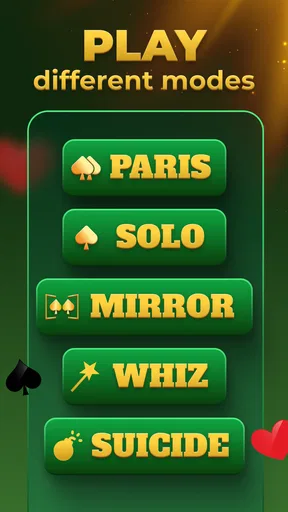
Game Modes Galore
One of the things that struck me immediately was the variety of game modes available. Whether you’re a solo player or want to partner up with a friend, there's something here for everyone:
- Single Player Mode: Perfect for when you’re on the go. The AI is surprisingly competent, giving you a run for your money.
- Multiplayer Mode: Connect with friends or family, and enjoy a classic game of Spades.
- Challenge Mode: Test your skills with various challenges that keep the game fresh and exciting.
Smooth and Sleek Graphics
The visual presentation of the game is impressive. The cards are easy to read, and the animations are smooth, making for a seamless gaming experience. The developers have done a fantastic job of recreating the feel of a real card game while adding a touch of digital flair. The subtle background music adds to the ambiance without being distracting.
Playing Without a Hitch
One of the app's best features is its offline capability. Whether you’re on a plane, in the middle of nowhere, or simply conserving data, you can play without a hitch. The app runs smoothly, and I didn’t experience any issues or crashes during my playthrough.
User-Friendly Interface
The app’s user interface is as friendly as your favorite dealer. Everything is laid out clearly, and the controls are intuitive. If you’re new to Spades, the app includes a handy tutorial to get you started. It’s like having a card-playing buddy right there, showing you the ropes.
Customization and Replayability
Customization options are always a plus in any game, and this app doesn’t disappoint. You can choose different card designs and backgrounds to suit your style. The replayability factor is high, thanks to the variety of game modes and the challenge of mastering the game against different AI levels.
A Card Game Companion
In a world where we’re often tethered to the internet, the game is a refreshing escape. It offers a classic card game experience that’s available at your fingertips, anytime, anywhere. Whether you’re a seasoned Spades player or a newcomer, this app has something to offer. So, next time you’re itching for a card game, why not give it a try? You might just find yourself spending hours perfecting your strategy and enjoying every moment of it.
Pros
- No internet connection required.
- User-friendly interface.
- Multiple difficulty levels.
- Customizable game settings.
- Smooth performance on most devices.
Cons
- Limited game variations.
- Ads can be intrusive.
- No multiplayer mode.
- Basic graphics and design.
- Lack of in-game tutorials.
FAQs for Spades Offline - Card Game
What is Spades Offline - Card Game and how does it work?
Spades Offline - Card Game is a classic card game app that allows you to play Spades without the need for an internet connection. It simulates the traditional four-player game where you can team up with an AI partner to compete against two other AI players. The objective is to score points by bidding and winning tricks.
Is Spades Offline - Card Game free to play?
Yes, Spades Offline - Card Game is free to download and play. While the core features are accessible at no cost, there may be optional in-app purchases available. These can include things like removing ads or purchasing cosmetic enhancements, but they are not required to enjoy the full game experience.
Does the app require an internet connection to play?
No, one of the key features of Spades Offline - Card Game is that it can be played entirely offline. This makes it perfect for situations where you don't have access to the internet, such as during travel or in areas with poor connectivity. All game features are available offline.
Can I customize the difficulty level of the AI opponents?
Yes, Spades Offline - Card Game offers customization options for adjusting the difficulty of AI opponents. This allows players of all skill levels to enjoy the game, whether you're a beginner or a seasoned Spades player. You can adjust these settings to ensure a challenging and enjoyable experience.
Are there any tutorials or guides available for new players?
Yes, the app provides tutorials and guides to help new players understand the rules and strategies of Spades. These resources are designed to teach you the basics and offer tips on how to improve your game. This makes it accessible even if you're new to Spades or card games in general.


